How to review remittances for a matter
You can review information about the remittances owed, pending, and paid on each matter, as well as any adjustments that have been made to the balance of the matter. To view this information, go to the Matters tab, click a matter card to expand it, and then select the Remittances section header: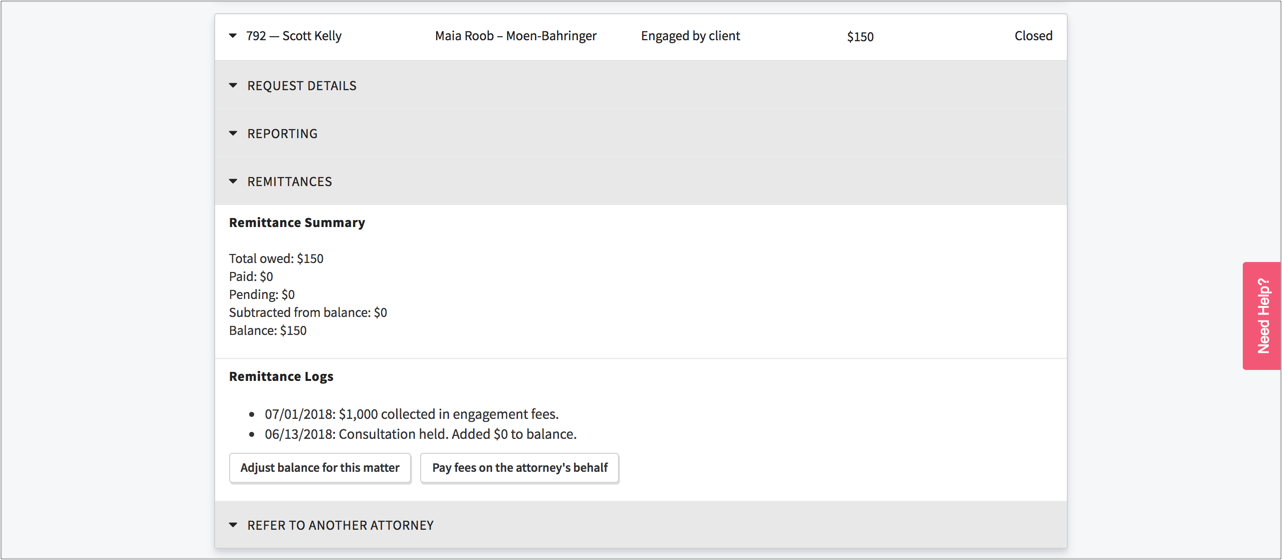
Note that the balance of the remittances that a lawyer still owes (as well as any pending check payments) is displayed at the top level of each matter card. You will also see the following information in the remittance summary:
- Owed: This is the total amount of remittances that the lawyer owes in relation to the matter. For example, if an attorney holds a consultation and is required to remit the consultation fee, that amount will display as "Owed".
- Paid: This is the total amount of remittances that the lawyer has paid.
- Subtracted from balance/Added to balance: This is the total amount that administrators have either added or subtracted from the balance. These adjustments are sometimes made to correct reporting errors or to waive fees.
- Balance: This is the remaining amount of remittances that the lawyer is obligated to pay. The balance is equal to the remittances owed less the remittances already paid. Any balance adjustments will also be factored into the outstanding balance.
The Remittance Logs\ will show you every event related to remittances, including when a remittance initially became due (e.g. a consultation was held, which obligates the attorney to remit $25) and when and by whom remittance payments are made.