How to confirm the receipt of check payments
When a lawyer (or an administrator acting on a lawyer's behalf) reports that a check payment has been mailed, the top level of the Matter card will indicate that there is a pending payment:
When you click to expand the Matter's Remittance section, you will also see a log reflecting the pending payment. In the example below, the administrator reported the pending check payment on the lawyer's behalf, so the log makes note of that as well: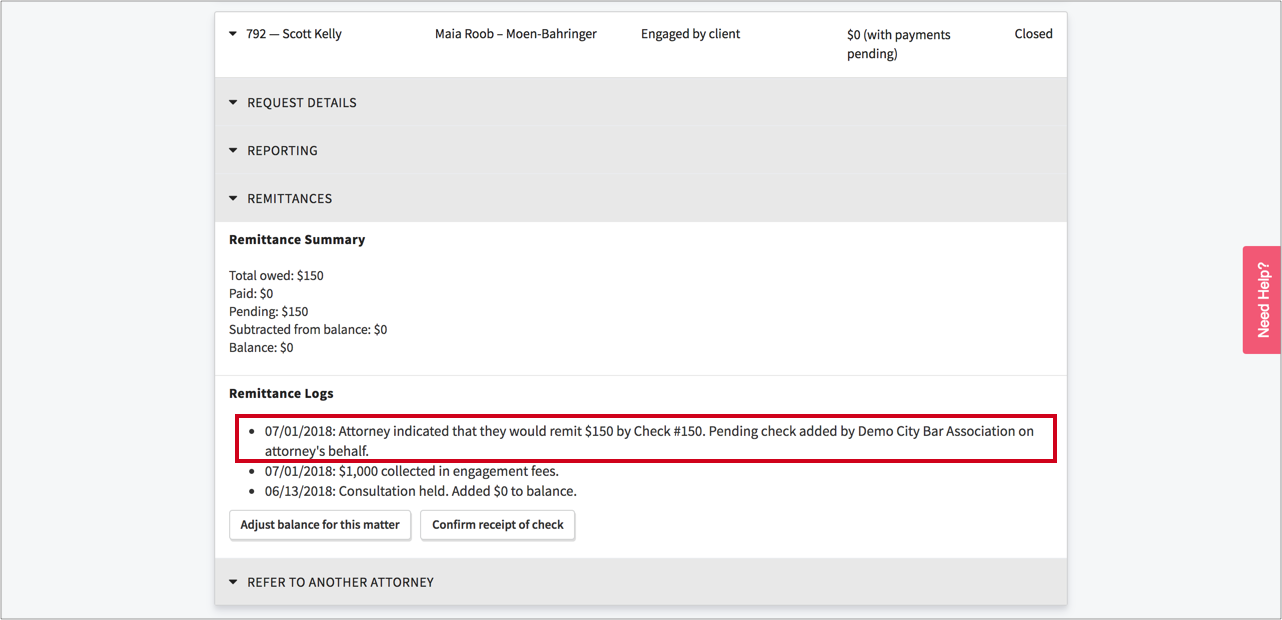
Once you received the check payment, the administrator can confirm receipt of the check by clicking the "Confirm receipt of check" button beneath the Remittance Logs. Doing so will trigger a pop-up modal:
To understand how to use this modal, a couple examples are in order:
- Check for correct # and amount is received
If the lawyer sends a check with the correct # and amount, simply type the check amount into the "Confirmed Amount" field and click the "Confirm check" button. The pending payment is now confirmed, and no further action is required. Note that a new remittance log is not created; instead, a sentence is added to the initial log about the check payment that confirms its receipt.
- Check with wrong check # but correct amount is received
Now let's say the lawyer mails a check for the correct amount but with the wrong check #. To correct the issue, you can check the checkbox that reads "Report this check lost or invalid" and click "Confirm check". This will have the effect of clearing the pending payment and creating a log that notes the reason for this. You can then use the "Pay fees on attorney's behalf" button, report a check payment with the correct check #, and then confirm receipt of that check using the "Confirm receipt of check" button.
- Check with correct check # but lesser amount is received
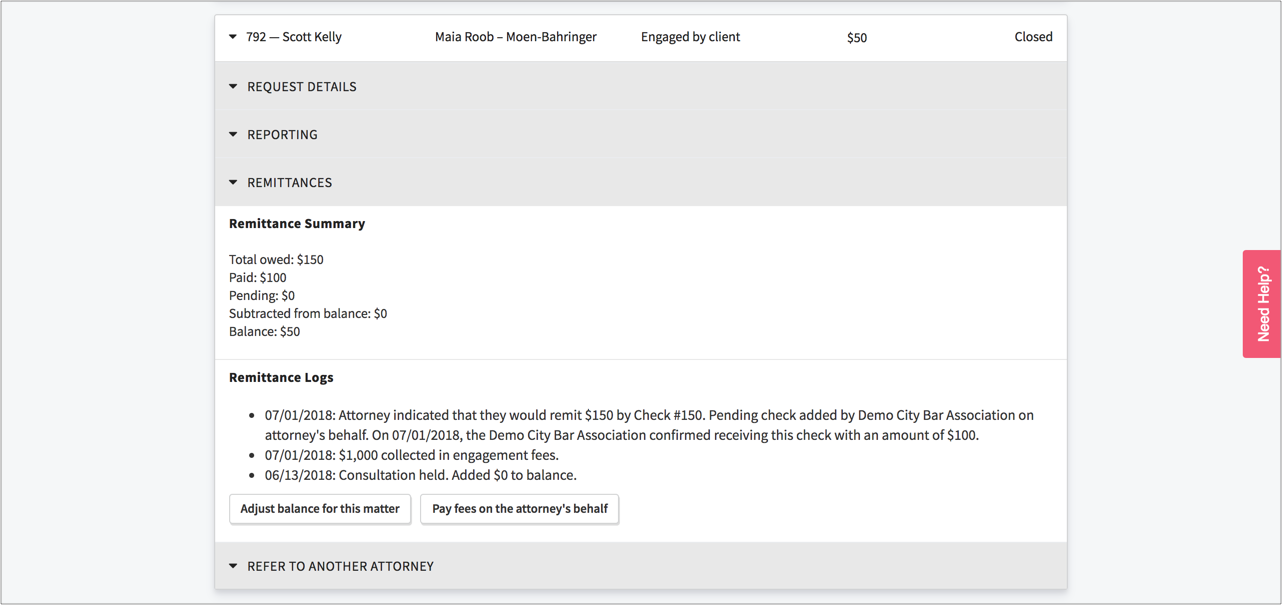
Let's say the lawyer mails a check for less than was owed but with the correct check #. To correct this issue, simply type the lesser amount into the "Confirmed Amount" field and click the "Confirm check" button:
The pending payment is now confirmed for the lesser amount, and a balance will now show on the matter. Note again that a new remittance log is not created; instead, a sentence is added to the initial log about the check payment that confirms its receipt:
- Check with correct check # but greater amount is received
Finally let's say the lawyer mails a check for greater than was owed but with the correct check #. To correct this issue, one approach would be to type the amount that was owed into the "Confirmed Amount" field and click the "Confirm check" button. The pending payment is now confirmed, and a sentence is added to the initial log about the check payment that confirms its receipt. You can then apply the remainder that was paid in excess as a balance adjustment to the matter, which would create a negative balance. Alternatively, you could simply report the check as lost or invalid, and contact the lawyer to have the send you a check for the correct amount.